
Ask in plain English
Find the records, drawings, reports, correspondence, and standards behind a practical project question.
Ask a practical question in plain English. Buildria finds the relevant project record, explains what it means, and helps you prepare the next action, ready for your review before anything is sent, published, or changed.
The relevant requirement has been found. Review the cited guidance and drawing before you issue the site instruction.
Sources used
Find the records, drawings, reports, correspondence, and standards behind a practical project question.
Prepare tasks, meetings, RFIs, plans, reports, letters, and trackers without sending or publishing them by accident.
Make editable Word documents and Excel workbooks that open in the real document workspace.
Move from answer to the programme, calendar, team, stakeholder, or document workspace with the context intact.
The agent understands the page you are on, the work you are trying to finish, and the records it is allowed to use. It can prepare the next step in the appropriate Buildria workspace, then leave the final decision with your team.
Instead of reconstructing the project story from messages, files, and meetings, ask the agent to find the context, prepare the next move, and show it to you before it changes anything.
Try asking
“What is holding up the drainage work, and what should I do next?”
Find answers across project files, correspondence, drawings, reports, meetings, tasks, flags, and site activity
Read uploaded Word, PDF, Excel, XML, and image-based project material when it is relevant
Turn a work-plan spreadsheet into a reviewable programme, plan, or task draft
Prepare meeting drafts, agendas, RFIs, reports, letters, stakeholder records, and follow-up from the current project record
Create editable Word and Excel outputs, then open the exact workspace where they can be reviewed
Navigate to the exact programme, meeting, task, team, stakeholder, or document page before the user approves the next step
Review quantities, rates, drawings, and assumptions together so the QS can see the basis, fix gaps, and prepare clear cost commentary without rebuilding the evidence trail.
Try asking
“Which BOQ items or rates need review, and what evidence supports the current allowance?”
Prepare building and road estimates with explicit assumptions
Generate and review BOQs using project quantities and descriptions
Check rate context, completeness, inconsistencies, and stale inputs
Trace commercial answers back to measurements, records, and sources
Use verified company experience, people, reference documents, and bid requirements to find gaps early and prepare focused proposal material with a reviewable evidence trail.
Try asking
“What are the biggest compliance gaps, and which projects best support this opportunity?”
Review RFP requirements, eligibility, deadlines, and go or no-go factors
Match the opportunity with approved projects, personnel, and capability evidence
Find compliance, experience, team, and submission gaps early
Prepare experience sheets, pursuit briefs, and proposal-ready drafts
Ask the question as you would ask a colleague. Buildria searches the project record, gives you a clear answer, and keeps the documents beside it so you can check the evidence yourself.
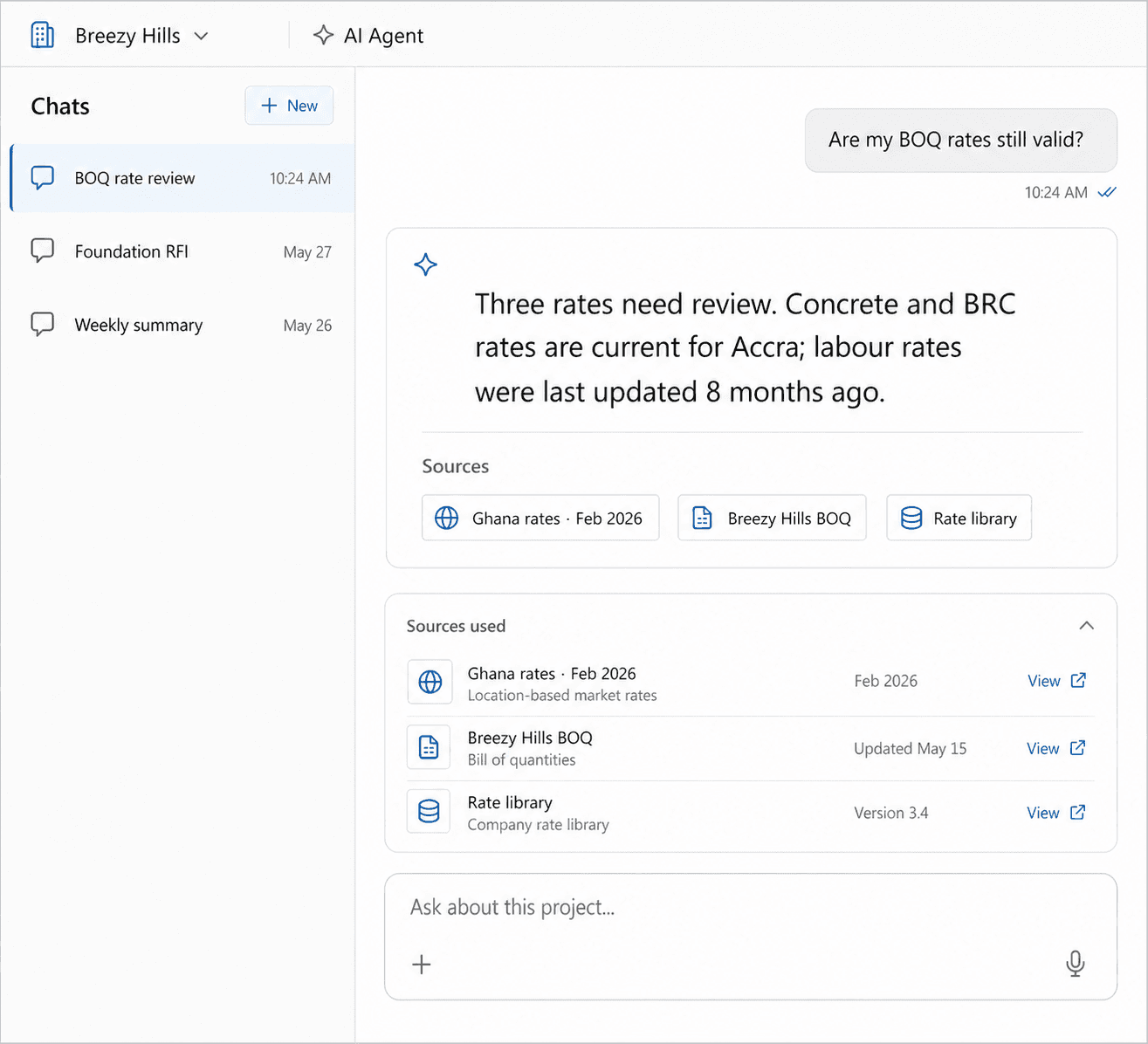
Ask what is holding up the work, where a road connects, what was agreed, or what a drawing requires, without knowing the exact file name first.
Open the standard, contract, drawing, or project record behind the answer before you act.
Use the answer to prepare a response, review point, or follow-up instead of starting from scratch.
Bring long contracts, reports, drawings, and related records together. Buildria helps the team find the clauses, changes, gaps, and risks that need attention before they become rework.
Source under review
Submittal Procedures
Requirement found
Long-lead equipment must be submitted for review no later than 12 weeks before its required delivery date.
Programme link
ME-LL-020 · Long-lead procurement
Action to confirm
Validate the procurement lead time
Go straight to the requirement, change, or gap that needs a decision.
Review the contract, drawing, RFI, report, or programme evidence together.
Buildria highlights what needs attention. Your team checks it and decides what moves forward.
Upload a programme, look-ahead, action list, or stakeholder register. Buildria reads the rows, maps the useful fields, and prepares a programme, plan, or draft records for your review.
May look-ahead programme.xlsx
7 activities mapped from the uploaded file
Site establishment
12–16 May · Site team
Stormwater pipe installation
19–30 May · Civil subcontractor
Kerb and channel
02–13 Jun · Roadworks team
Use dates, owners, WBS codes, dependencies, and headings from an uploaded workbook instead of copying every row by hand.
Review the mapped programme or task list, correct anything that needs judgment, then choose whether to publish it.
Open the programme, calendar, stakeholders, or task page directly from the agent when it is ready.
Ask Buildria to prepare a professional Word document or Excel workbook from the records you have already collected. Give it a reference template when the organisation has a preferred look.
4. Progress this period
The contractor reported 64% completion against 71% planned. Drainage installation remains behind the approved lookahead.
Prepare meeting notes, RFIs, project briefs, experience sheets, reports, letters, and working trackers from real project evidence.
Use supplied reference documents and templates when available, or start from a clear professional default in the full document workspace.
Open the actual Word or Excel file, make final edits, and download or save it when it is ready.
Buildria can prepare the meeting, task, report section, correspondence, or RFI from the context already found. You review it, refine it, and decide when it is allowed to go forward.
Answer ready
Choose what happens next
Draft an RFI
Clarify the approved equipment alternatives.
Add a programme reminder
Review the submission 12 weeks before delivery.
Create a review task
Assign procurement lead-time confirmation.
Use the meeting purpose, likely attendees, project records, dates, and previous discussion to prepare a useful starting point.
When it needs a date, owner, agenda, recipient, or confirmation, the agent asks instead of quietly guessing.
Meetings, messages, invitations, and published actions remain drafts until a user reviews and approves them.
The agent can stay with you as it moves between the project record, programme, meetings, team, stakeholder, and document workspaces, showing the draft and asking before it makes a consequential change.
Programme
Draft imported from May look-ahead programme.xlsx
Open the programme instead of a generic project page, or move to the meeting, task, stakeholder, or document screen that needs your review.
Use the live page to see the fields being prepared and to take over whenever you want.
Retain the question, answer, sources, draft, and resulting action in the project record.
Find the answer, review the document, prepare the report, and give the right person the next clear action.